Table of Contents
Binance is hard to miss in the crypto world. Even if you only glance at crypto news now and then, the name keeps popping up, quietly running a huge chunk of global crypto trading.
Over the years, it has built a reputation for speed, reliability, and reach, all while finding ways to make crypto trading easier and more flexible for everyday users.
One way it has done this is by creating Binance P2P, a platform that gives people a smoother, more direct way to trade crypto. In this article, I’ll walk you through how to navigate Binance’s P2P marketplace, avoid common pitfalls, and make the most of every trade, so you can trade smarter, safer, and with a little less stress.
What is Binance P2P?
Binance P2P (peer-to-peer trading) is a marketplace on the Binance platform where people can buy and sell crypto directly with each other, while Binance acts as a secure middleman to keep transactions smooth and safe.
Unlike the usual exchange, where everything happens on a central order book, Binance P2P connects buyers and sellers directly, allowing you to choose who you trade with and select your preferred payment method. Throughout the process, Binance holds the crypto safely until both sides confirm that payment has been completed.
The platform supports a variety of cryptocurrencies, including USDT, Bitcoin, Ethereum, and Binance Coin allows users to trade using popular local payment methods such as bank transfers, mobile money, and digital wallets.
How to Buy on Binance P2P
Buying on Binance P2P is simple once you know what to look for. Here’s how to do it smoothly:
- Download the Binance app from the official app store or website and create a verified account (P2P trading requires identity verification (KYC) for security).
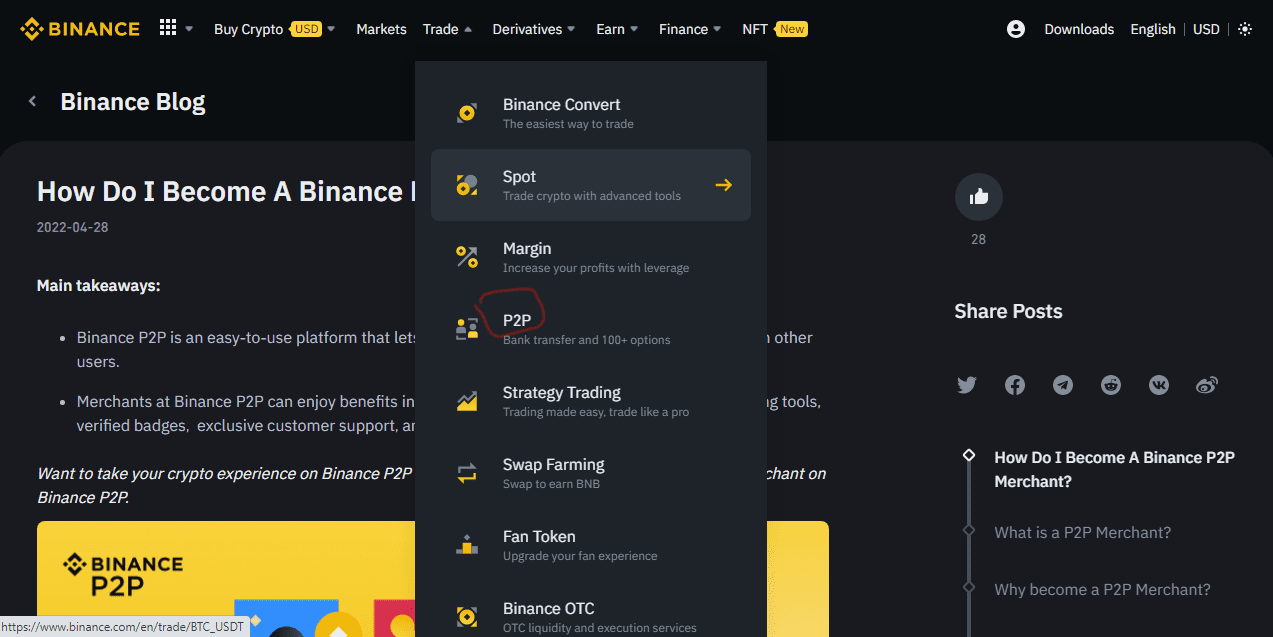
- Open the app, and from the homescreen, go to Trade → P2P to access the P2P marketplace.
- Select “Buy” and choose the cryptocurrency you want.
- Enter the amount you want to buy, either in your local currency or the exact crypto amount. The platform will automatically show you how much crypto you’ll receive.
- Browse the list of sellers carefully. Check their completion rate, number of successful trades, reviews, and supported payment methods. Pick a reliable seller.
- Click “Buy” to confirm the details, and follow the seller’s payment instructions.
- Once you’ve sent payment, tap “Transferred, notify seller”. Do not confirm payment until you’ve actually sent it.
- Wait for the seller to release the crypto. Binance will automatically release it to your wallet once the seller confirms receipt of payment.
How to Sell on Binance P2P
Selling on Binance P2P works the same way, just in reverse:
- Download the Binance app from the official app store or website and create a verified account (P2P trading requires identity verification (KYC) for security).
- Open the app and go to Trade → P2P to access the marketplace.
- Select “sell” and choose the cryptocurrency you want to sell, such as USDT, BTC, ETH, or BNB.
- Enter the amount you want to sell, either in crypto or your local currency, and the platform will calculate how much you’ll receive.
- Browse the list of buyers and choose a buyer you feel comfortable with.
- Click “Sell” and wait for the buyer to send payment. Do not release crypto until you’ve confirmed that the funds have reached your account.
- Once you have confirmed the buyer’s payment, release the crypto from escrow. Binance will transfer it automatically to the buyer to complete the transaction.
Safety and Best Practices When Trading on Binance P2P
1. Keep communication within Binance
Use the platform’s chat feature to communicate with the buyer or seller. Avoid moving conversations to WhatsApp, Telegram, or other channels until after the trade is complete. This ensures that Binance can intervene if there’s a dispute.
2. Check the other party’s reputation
Review the other person’s completion rate, number of successful trades, and reviews before trading. For buyers, the trade history may be limited, so choose someone you feel comfortable with and consider starting with a small test trade if you’re unsure.
3. Stick to familiar payment methods
Use payment methods you know and trust, such as bank transfers with your own bank or well-known mobile wallets. Avoid sending money through unfamiliar or third-party channels, as these increase the risk of fraud.
4. Double-check all payment details
Mistakes happen. Always verify account numbers, bank details, and the exact amount before sending any money. For sellers, don’t release crypto until you see the funds in your bank account, not just a screenshot.
5. Start with small trades as a beginner
If you’re new to P2P trading, begin with small amounts until you understand the process fully. This will help you learn how payments, confirmations, and crypto releases work while minimizing risks for you.
6. Secure your Binance account
Protect your account with two-factor authentication (2FA), a strong password, and regular monitoring. Your account is the gateway to your crypto, so keeping it secure is crucial for safe P2P trading.
Fees and Limits on Binance P2P
1. Fees
One of the biggest advantages of Binance P2P is that buyers and sellers don’t pay trading fees. This means that the full amount you spend or receive goes straight into your crypto.
While the P2P trades themselves are free, moving crypto in or out of your Binance wallet can still incur small network fees. These depend on the cryptocurrency and the blockchain network you’re using.
Additionally, your bank or payment provider may charge small transfer fees depending on your region or chosen payment method.
2. Limits
1. Verification-Based Limits
Your P2P trading limits depend on how much of your identity you’ve verified on Binance:
Basic/KYC Level 1: Allows smaller daily trade amounts, suitable for beginners.
Advanced Verification: Opens higher daily or even unrestricted trading limits on certain payment methods. Completing verification not only increases your limits but also adds extra security to your account.
2. Merchant-Set Trade Limits
Some sellers or buyers (especially P2P merchants) set their own minimum and maximum order amounts. So, always check these limits before starting a trade to make sure your trade falls within the allowed range.
3. Daily and Monthly Caps
Binance may also impose daily or monthly trading caps depending on your country’s regulations, and knowing these limits helps you plan larger trades safely without running into unexpected restrictions.
Common Pitfalls of Trading on Binance P2P and Possible Solutions
Even on Binance P2P, things don’t always go perfectly, and that’s totally normal. Here are the most common issues and how to handle them:
1. Payment delays
Sometimes your crypto gets stuck waiting because the buyer is slow, forgetful, or doesn’t respond at all. This can be especially annoying during busy trading hours or when dealing with new users.
Solution: Wait for the platform’s time limit, and if the buyer doesn’t act, cancel the order. The crypto will automatically return to your wallet.
2. Human errors in payment
Occasionally, buyers make mistakes, transferring the wrong amount, sending funds to the wrong account, or typing incorrect details. These errors can create confusion or even disputes if not addressed carefully.
Solution: Double-check payment details in Binance chat before releasing crypto. If a mistake occurs, wait for the buyer to correct it, and escalate through Binance if necessary.
3. Trade cancellations
Sometimes trades can get canceled unexpectedly because your order exceeds verification limits, a merchant’s minimum/maximum amount, or daily/monthly caps. It can be frustrating when you’re trying to move larger amounts quickly.
Solution: Always review all applicable limits before starting a trade to avoid unnecessary cancellations.
4. Price discrepancies
Crypto prices fluctuate constantly, so occasionally the trade price may not match your expectations, or extra fees might not be immediately clear. This can leave you feeling confused or dissatisfied with the trade.
Solution: Confirm the trade price and terms clearly before accepting an order, and use Binance chat to clarify any doubts.
5. Disputes
Disagreements can happen if one party claims payment was sent, but the other hasn’t received it, or if there’s confusion about trade terms. Disputes can stall a trade and create stress.
Solution: Keep all proof of payment and communication within Binance. Escalate to Binance support if the dispute cannot be resolved directly.
6. Limited liquidity or payment methods in certain regions
In some regions, it may be harder to find buyers or sellers for specific crypto amounts or preferred payment methods. This can delay trades or force you to use less convenient methods.
Solution: Check available buyers/sellers and payment options before starting a trade, and consider adjusting your trade amount or payment method to match active offers.
Advanced Tips for Best Rates on Binance P2P
Here are smart, practical tips that can help you squeeze the best possible value out of every trade:
1. Compare rates across multiple merchants before locking in a trade
Rates can vary widely between merchants, even within seconds. Some sellers offer tighter margins, while others add hidden markups. Checking 3–5 offers before choosing helps you avoid paying more or receiving less than necessary.
2. Trade during peak liquidity hours
Rates are generally better when more people are actively trading. In many regions, this happens during daytime hours or early evenings. When liquidity is high, merchants compete more aggressively, which leads to better deals.
3. Use filters to sort by “lowest price” or “highest amount available.”
Binance P2P’s filters help you quickly identify sellers offering the most competitive rates. Sorting by “lowest price” (for buyers) or “highest price” (for sellers) saves time and ensures you don’t miss top-tier offers buried down the list.
4. Refresh the listings before taking an offer
P2P rates move quickly. A better offer may appear a few seconds after your page loads. Refreshing ensures you’re seeing the most current, competitive prices rather than accepting an outdated one.
5. Avoid peak volatility periods
It is better to trade when the market is calmer because, whenever crypto prices swing rapidly, merchants usually increase their margins to protect themselves. If you trade in a calmer market, the rates will be tighter and better.
Frequently Asked Questions (FAQs) About Trading on Binance P2P
1. Is Binance P2P safe?
Yes, Binance P2P is safe. Binance uses escrow protection and an in-app dispute system to keep your funds secure.
2. Why do merchants offer different rates from the market price?
Merchants sometimes offer different rates because P2P merchants set their own margins based on volatility, liquidity, and demand. You may see higher prices during busy periods or when your preferred payment method is in high demand.
3. Can someone reverse a bank transfer after I release crypto?
Bank transfers are generally irreversible once processed, but certain banks may reverse flagged payments. This is why it’s safer to trade with high-reputation buyers and confirm payment thoroughly.
4. What if I sent payment but didn’t receive the crypto?
If you’ve already paid but the seller hasn’t released the crypto, share clear proof of payment in the Binance chat. If the seller doesn’t respond or disputes it, open an appeal. Binance will freeze the crypto and review both sides. If your proof checks out, the platform will release the crypto to you.
5. Can I change my payment method after opening a trade?
No, payment methods cannot be changed once a trade begins. You must cancel and reopen a new order with the correct details.
Conclusion
Binance P2P is one of the easiest and most flexible ways to trade crypto using your local payment methods. Once you understand how to choose reliable merchants, avoid common mistakes, and protect yourself with simple safety practices, P2P trading becomes fast, stress-free, and extremely cost-effective.
With the right approach, Binance P2P isn’t just a marketplace; it’s a powerful tool to make your crypto trading smarter and more efficient.
Last updated on December 12, 2025