Table of Contents
You have picked your matches, built your bet slip, and you’re ready to place your bet. Then you notice your SportyBet wallet balance isn’t enough. It’s a small problem, but if funding your account takes too long, you could miss the odds you wanted or the market could close before you complete your bet.
A fast funding option helps you avoid that situation. It lets you top up your SportyBet account in minutes so you can focus on placing your bets instead of worrying about payment delays.
That’s why this article explains how you can fund your SportyBet account on Prestmit within minutes.
Simple Way to Fund Your SportyBet Account in Minutes: Prestmit

Funding your SportyBet account on Prestmit is simple, fast, and completely free. You don’t pay any extra fee to top up your betting wallet, so every naira you deposit goes toward your betting balance. Whether you’re making a quick deposit before kick-off or adding funds during a live game, Prestmit gives you an easy way to complete your payment and continue betting without unnecessary stress.
You can fund your SportyBet account using your Prestmit wallet or by making a direct bank transfer, giving you the flexibility to choose the payment method that works best for you. Once your payment is successful, you can continue placing your bets without leaving the app or dealing with complicated payment procedures.
Prestmit uses SSL certificate encryption, biometric authentication, and two-factor authentication to help protect your funds and personal information, so you can fund your betting account with confidence.
Below is how to fund your SportyBet account on Prestmit.
Step One: Create a Prestmit Account
Visit the official Prestmit website or download the Prestmit app from the Google Play Store if you use an Android device or the Apple App Store if you use an iPhone.
After installing the app, open it and sign in to your existing account. If you’re a new user, create an account by providing the required information. The registration process only takes a few minutes.
Step Two: Create a Virtual Bank Account
After logging in, create your virtual bank account if you haven’t already done so. Click “Top Up” on the homepage and follow the prompts to generate your dedicated virtual account number.
Transfer funds from your bank account to your virtual account. Once the transfer is successful, the money will be credited to your Prestmit wallet. If you’ve previously created a virtual account, simply fund your wallet and continue to the next step.
Step Three: Click “Bills” on the Homepage
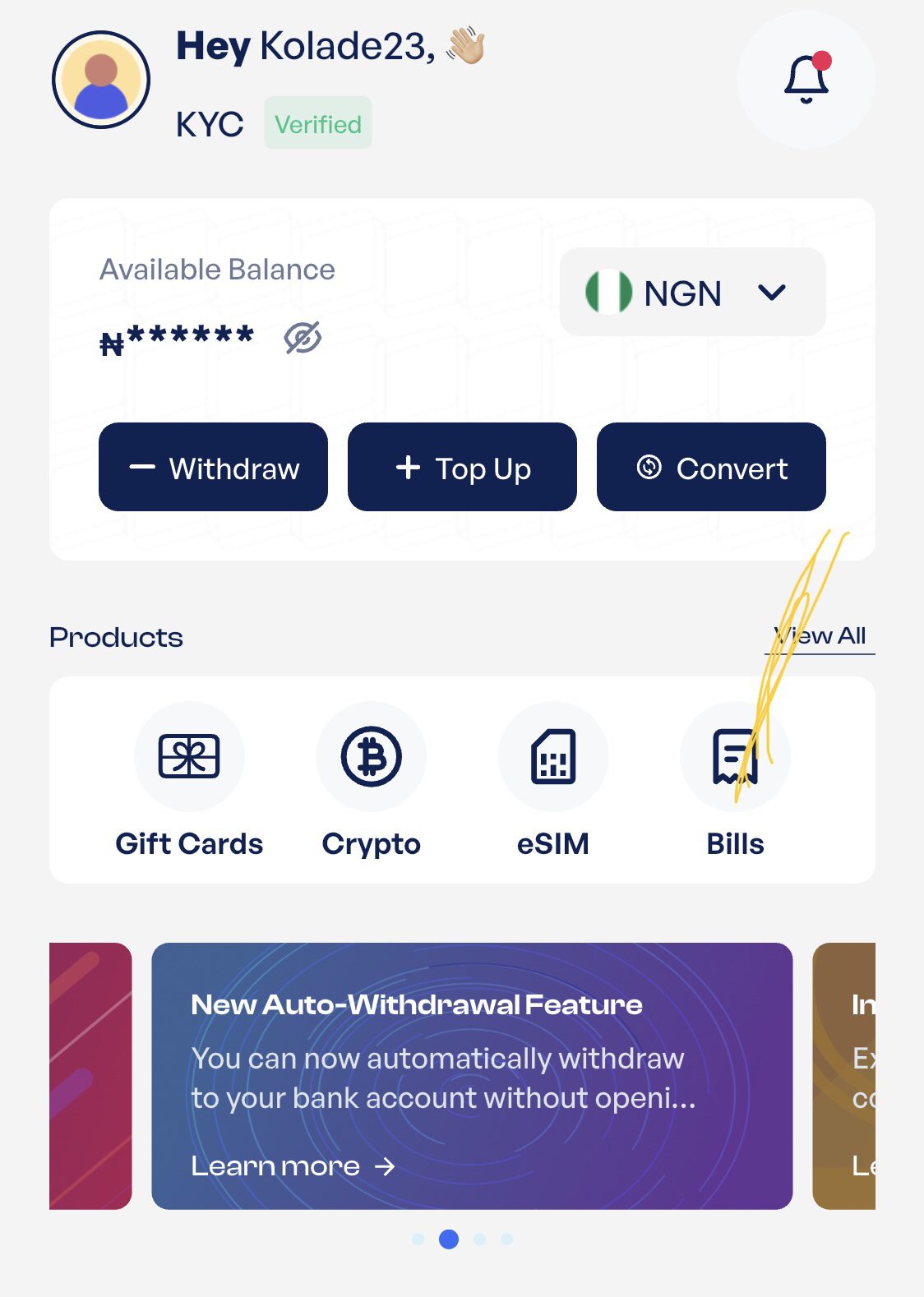
After funding your wallet, return to the homepage and select “Bills.” Select “Fund Betting Account” from the available bill payment options, then choose SportyBet from the list of supported betting platforms.
Step Four: Enter Your Funding Details
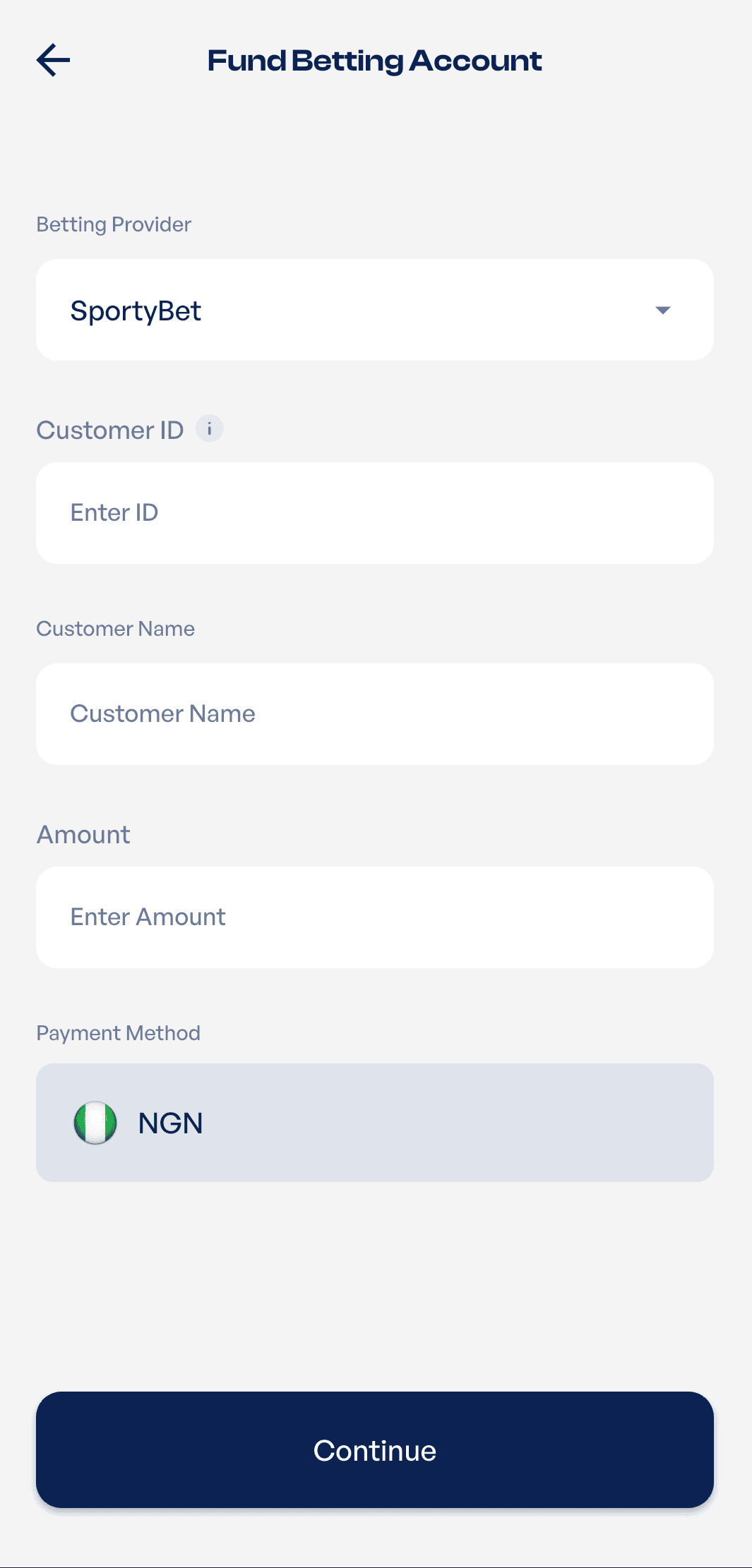
Enter your SportyBet Customer ID and the amount you want to deposit into your betting wallet. Take a moment to review your details before tapping “Continue.” Once your payment is successful, the deposit will be processed and credited to your SportyBet account.
Find Your SportyBet Account Now
Download Prestmit From Google Play Store
Download Prestmit From App Store
What to Do If Your SportyBet Deposit Doesn’t Reflect
Most SportyBet deposits reflect within a few minutes. However, occasional delays may happen because of temporary network issues or system maintenance. If your deposit doesn’t appear in your SportyBet wallet:
- Confirm that your Prestmit transaction was successful.
- Wait a few more minutes and refresh your SportyBet account.
- Verify that you entered the correct SportyBet Customer ID.
- Check your Prestmit transaction history for the payment status.
- Contact Prestmit customer support if your deposit still hasn’t reflected after a reasonable waiting period. Keep your transaction ID and payment details available to speed up the resolution process.
Common Mistakes to Avoid When Funding Your SportyBet Account
Funding your SportyBet account only takes a few minutes, but a simple mistake can delay your deposit or cause your payment to fail. Before you click “Continue” to complete your transaction, take a moment to avoid these common errors:
- Entering the wrong SportyBet Customer ID: Your Customer ID tells SportyBet where to credit your deposit. Always check that every digit is correct before confirming your payment. A wrong Customer ID may send your funds to another account or prevent your deposit from reflecting.
- Selecting the wrong betting platform: Prestmit supports several betting platforms. If you accidentally choose another betting site instead of SportyBet, your payment may not reach your intended account. Always confirm the platform before proceeding.
- Typing the wrong deposit amount: Enter the exact amount you want to fund. A quick review before payment helps you avoid depositing less or more than you planned.
- Skipping the payment confirmation page: It only takes a few seconds to review your details. Before completing your payment, confirm your SportyBet Customer ID, the betting platform you’ve selected, and the amount you’re depositing.
- Exiting the app before your transaction is completed: Wait until you receive a successful payment confirmation before closing the Prestmit app. This ensures your transaction has been processed successfully.
- Panicking when your deposit doesn’t reflect immediately: Although most deposits are processed within a few minutes, occasional delays can happen because of network issues or system maintenance. Give the transaction a little time before assuming something went wrong.
- Contacting customer support without checking your transaction status: Before reaching out for help, check your Prestmit transaction history to see whether your payment was successful, pending, or unsuccessful. This information will also help the support team resolve your issue more quickly if you need assistance.
.
Frequently Asked Questions
1. Is there a minimum amount I can deposit?
The minimum deposit amount depends on SportyBet’s current funding requirements. You’ll see the accepted amount during the funding process if any limits apply.
2. Does Prestmit support funding other betting accounts apart from SportyBet?
Yes. Prestmit also supports several other betting platforms available in Nigeria, including Bet9ja, BetKing, BetWay, 1xBet, MerryBet, BangBet, NairaBet, etc.
3. Can I use Prestmit to fund someone else’s SportyBet account?
Yes. Simply enter the correct SportyBet Customer ID for the account you want to fund before completing the payment.
4. Can I fund my SportyBet account with airtime?
Yes. You can sell your airtime for cash on Prestmit and receive the payment directly in your Prestmit wallet. You can then use the funds in your wallet to top up your SportyBet account quickly and conveniently.
5. What should I do if I entered the wrong SportyBet account details?
Contact Prestmit customer support immediately with your transaction details. The support team will advise you on the available options based on the status of your transaction.
Conclusion
A smooth betting experience starts with a simple and reliable way to fund your wallet. Prestmit makes it easy to top up your SportyBet account without unnecessary stress, so you can focus on placing your bets instead of worrying about your deposit. Before making any payment, always confirm your SportyBet Customer ID and the amount you’re depositing to avoid funding issues.
You can also use Prestmit to pay electricity bills, renew DStv, GOtv, and StarTimes subscriptions, buy airtime and data, and fund other supported betting accounts, all from one convenient app.