Table of Contents
Checking your American Express (AMEX) gift card balance before you start shopping may seem like an easy thing to ignore, but it is a small step that can save you from an unpleasant surprise.
You really do not want to get to checkout with a cart full of items only to discover that your balance cannot cover the purchase, especially when your AMEX gift card is your only payment option.
The knowledge of your available balance helps you plan your spending and avoid last-minute payment problems. This guide will show you how to check your AMEX gift card balance and what to do if you run into any issues.
How to Check Your AMEX Gift Card Balance Online
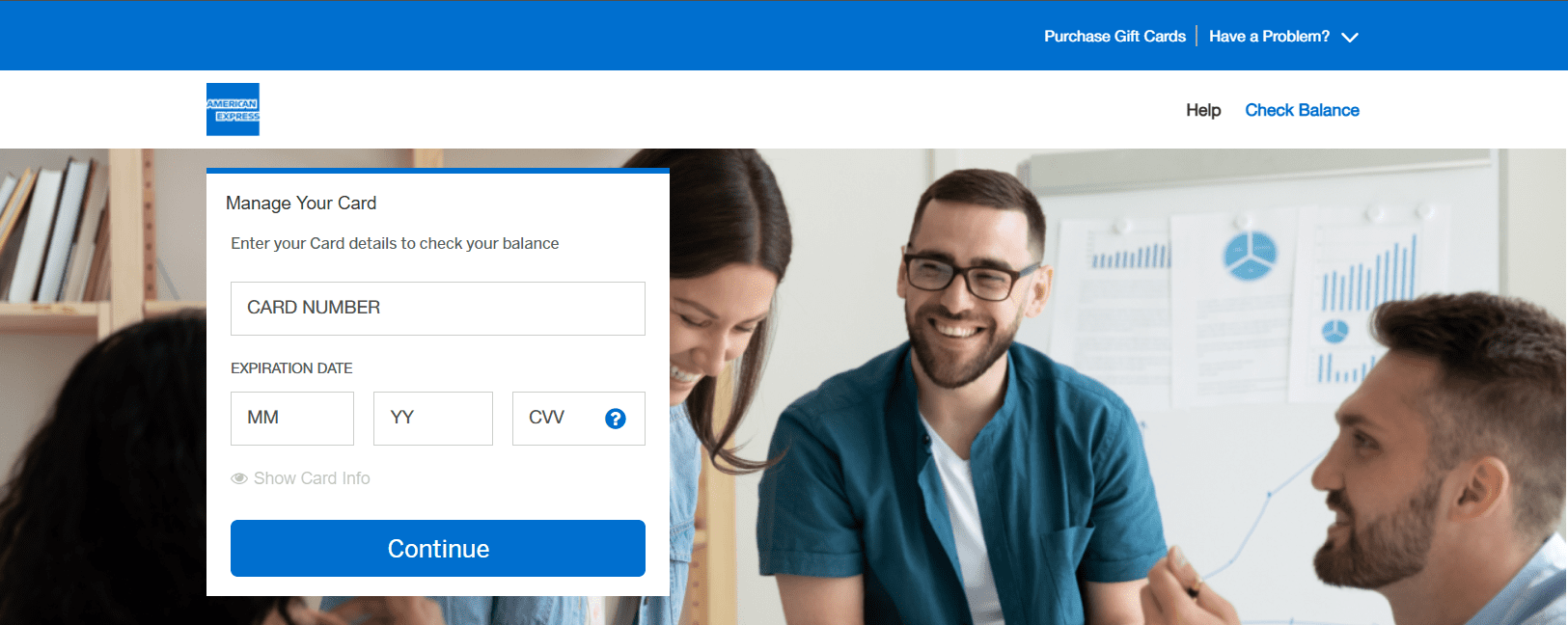
The quickest way to check your American Express Gift Card balance is online. The process only takes a few minutes, and all you need are the details printed on your card.
Here’s a step-by-step guide:
Step 1: Visit the American Express Gift Card website
Go to the official American Express Gift Card balance check page. Once the page loads, you will see a form where you can enter your gift card details.
Step 2: Enter your card information
On the form, enter the required details from your American Express Gift Card, including your 15-digit card number, expiration date, and security code. Make sure each detail is entered correctly to avoid errors.
Step 3: Submit your details
After entering your information, click “Continue.” The page will process your request and display the amount available on your card.
How to Check Your Amex Gift Card Balance by Phone
If you prefer not to check your balance online, you can do it over the phone. American Express provides an automated system that allows you to check your available balance in a few simple steps.
Step 1: Call the customer service number
Dial 1-877-297-4438, the American Express Gift Card customer service number, or use the customer service number provided with your card.
Step 2: Follow the prompts
Listen to the instructions and select the option to check your gift card balance, then enter your card details when prompted.
Step 3: Listen to your balance
Once your information has been verified, the system will provide your available balance.
What You Should Do If You Cannot Check Your AMEX Gift Card Balance
1. Double-check your card details
The most common reason a balance check fails is incorrect information. Make sure you entered your 15-digit card number, expiration date, and security code exactly as they appear on the card. A single incorrect digit can prevent the system from retrieving your balance.
2. Refresh the page or try again later
Sometimes the American Express Gift Card website may experience temporary technical issues or maintenance. If the page is not loading properly or keeps returning an error message, refresh the page or wait a few minutes and check again later.
3. Try a different device or browser
Sometimes, your browser settings, extensions, or stored cache may interfere with the balance check process. If the website is not working as expected, try opening it in a different browser or using another device. This simple step can often resolve the issue.
4. Confirm that your card has been activated
Most American Express Gift Cards come already activated and ready to use. However, some cards may require activation before you can use them or check the balance online. If your card is new and you are unable to access the balance, review any activation instructions that came with the card.
5. Contact American Express customer service
If you have tried the steps above and still cannot access your balance, contact American Express customer support for assistance. A representative can help verify your card information, identify any issues with the card, and guide you through the next steps.
Tips for Managing Your American Express Gift Card Balance

1. Keep a Record of Your Purchases
If you use your gift card frequently, it can be easy to lose track of how much money is left. Keeping a record of your purchases or occasionally reviewing your transaction history can help you stay aware of your remaining balance.
2. Use the Remaining Balance
Many people use a gift card once or twice and then forget about the small amount left on it. Instead of leaving a few dollars unused, consider using the remaining balance toward a future purchase so you get the full value of the card.
3. Hold On to Your Card Until the Balance Is Fully Spent
Even if you think your card is empty, avoid throwing it away immediately. Keeping the card until the balance reaches zero allows you to verify transactions, check your remaining balance, and resolve any issues that may arise.
4. Protect Your Card Details
Treat your American Express Gift Card the same way you would treat a debit or credit card. Avoid sharing your card number or security code with anyone, and only enter your card details on trusted websites when making purchases.
5. Check Your Balance Before Large Purchases
Before using your gift card for an expensive purchase, check your available balance to make sure it can cover the transaction. This can help you avoid declined payments or the need to split the payment between multiple methods.
Best Platform to Sell Unused AMEX Gift Card – Prestmit
If you do not wish to redeem your card, a viable alternative is to sell AMEX gift cards for cash instead of leaving them unused. Here, the best platform to sell an AMEX card is Prestmit. The platform offers competitive rates and a fast transaction process, so you get good value for your card without a long wait for payment.
Before selling your AMEX gift card, you can use Prestmit’s automated gift card rate calculator to check its current value. This allows you to see how much you are likely to receive. Once your transaction is completed, you can receive your payment in different currencies, including Naira, Cedis, USD, and cryptocurrency. Prestmit also provides a multi-currency wallet that allows you to hold and convert funds whenever you need to.
To make the process even more convenient, you can enable the auto-withdrawal feature on the platform. This allows you to receive payments in Naira and Cedis directly in your local bank account without having to process each withdrawal yourself.
The platform also comes with advanced security features like SSL encryption, two-factor authentication (2FA), and biometric verification designed to protect your account and transactions.
To sell your AMEX Gift Card on Prestmit, follow the steps below.
How to Sell an AMEX Gift Card on Prestmit
Step 1: Create a Prestmit Account
Visit the official Prestmit website or download the Prestmit app on the Google Play Store or App Store. Sign up and set up your account to get started.
Step 2: Navigate to the Gift Card Section
Screenshot
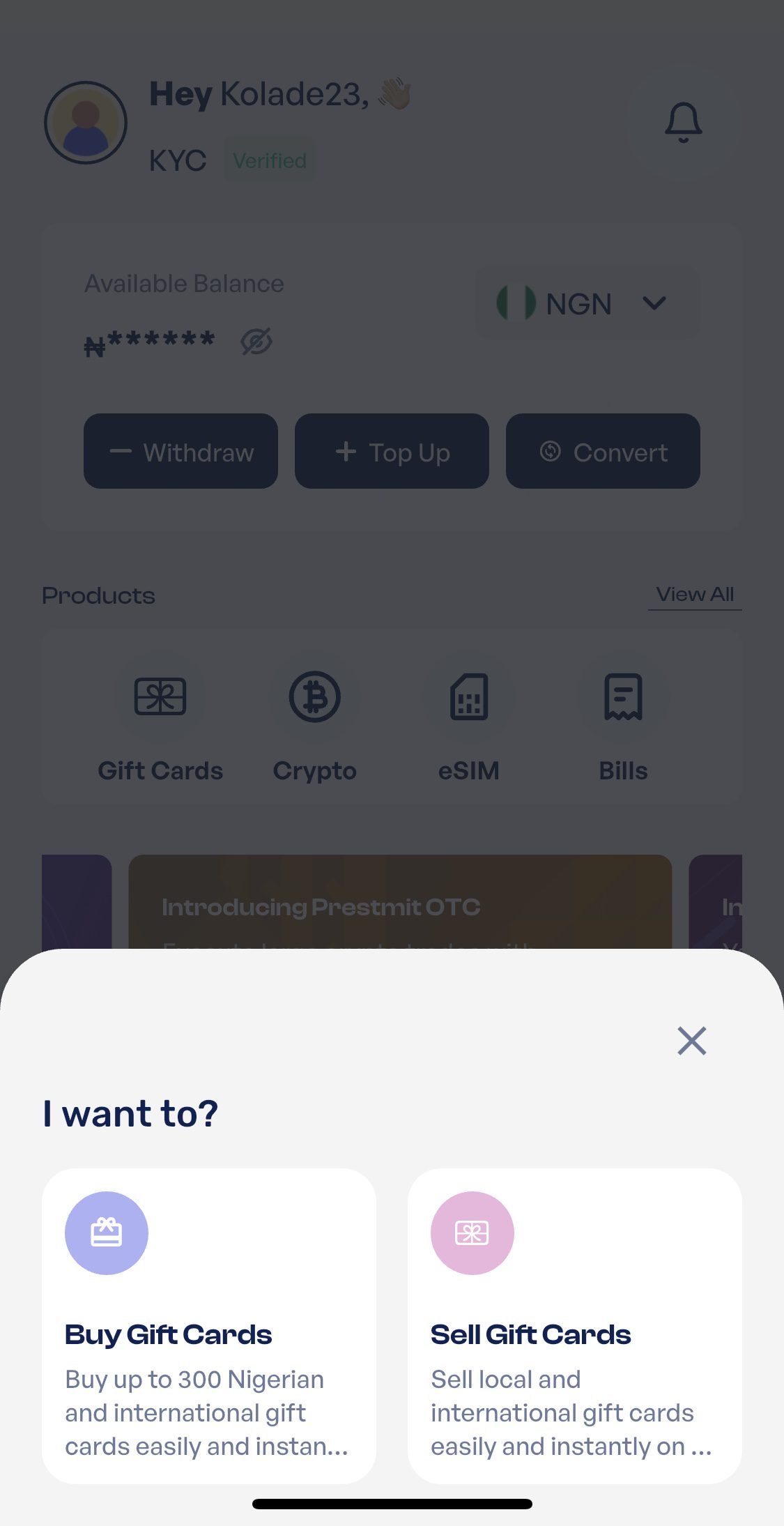
Log in to your account and go to the Gift Card category on your dashboard. Then select “Sell Gift Cards” to begin the transaction.
Step 3: Choose Your Preferred Payout Currency
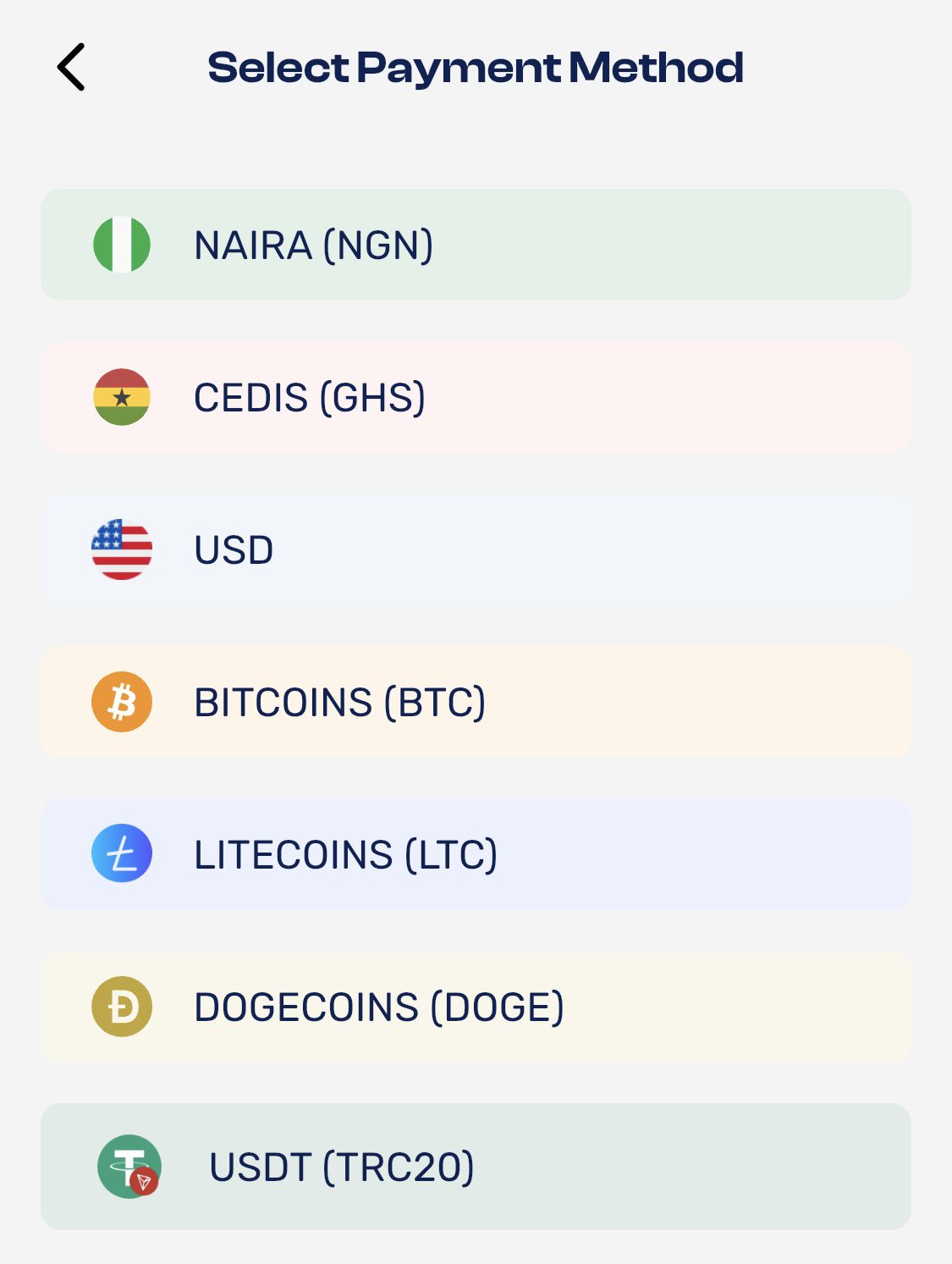
Select the currency you would like to receive after the sale. Depending on your location and preference, you can choose from available payout options such as Naira, Cedis, Cryptocurrency, or US Dollars.
Step 4: Select AMEX Gift Card
Choose “American Express” from the list of supported gift cards and select the appropriate subcategory.
Step 5: Enter Your Gift Card Details
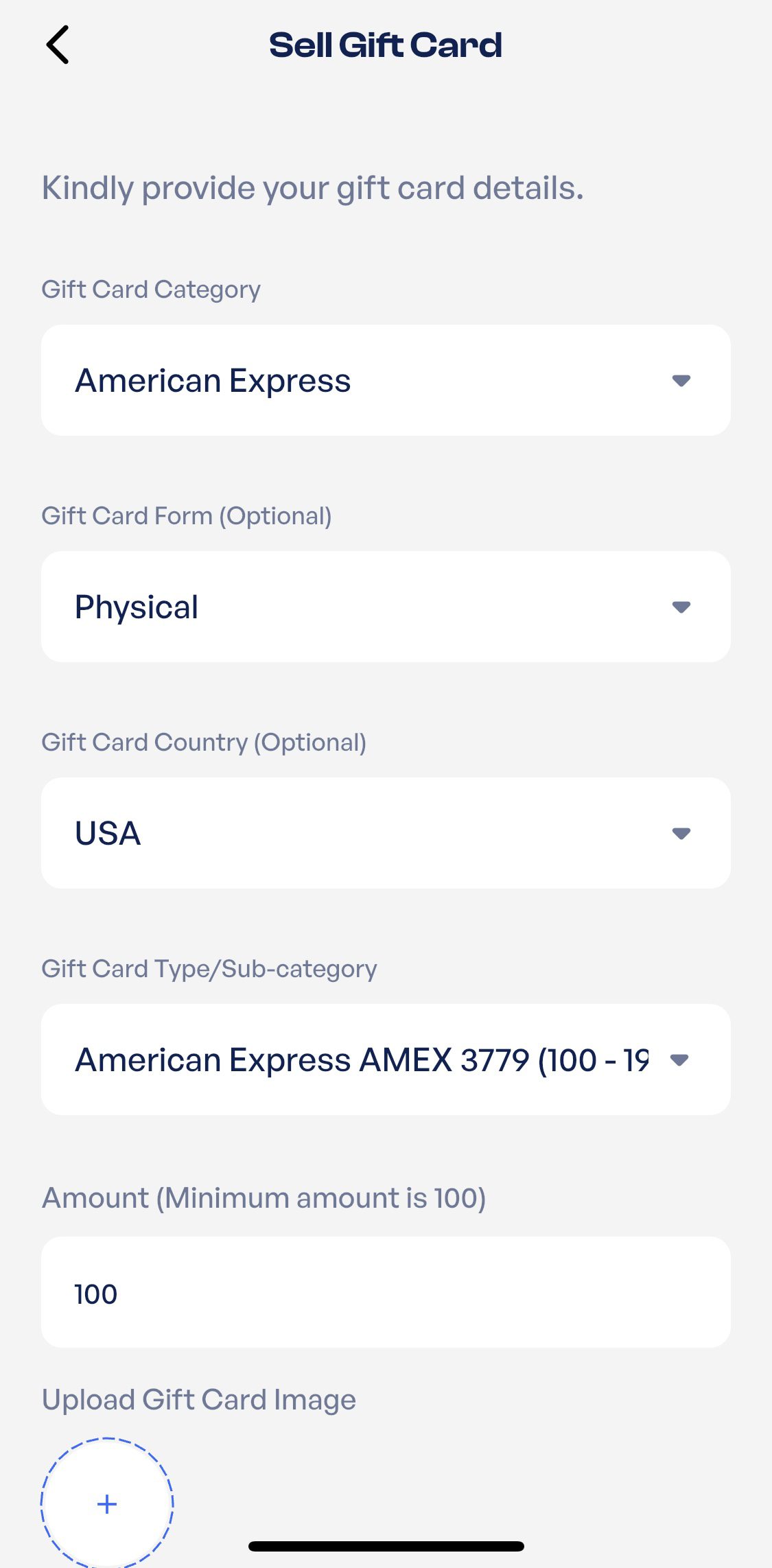
Provide the value of your AMEX Gift Card and enter any additional information.
Step 6: Upload Your Gift Card
If you are selling a physical gift card, upload a clear image of the card. If you are selling a digital gift card, enter the required code or details as instructed.
Step 7: Review and Complete the Transaction
Carefully review the information you provided and click Proceed. Follow the remaining prompts to submit your transaction. Once approved, Prestmit will process your payment based on your selected payout method.
Frequently Asked Questions
1. How do I check my American Express Gift Card balance?
You can check your American Express Gift Card balance online through the official balance check page or by calling the American Express Gift Card customer service number. Both methods only require your card details and take a few minutes to complete.
2. Can I check my AMEX Gift Card balance without the card?
No, you can’t check your balance without the card. To check your balance, you will need the card details, including the card number, expiration date, and security code.
3. Is there a fee to check my American Express Gift Card balance?
No, American Express does not charge a fee for checking your gift card balance online or by phone.
4. Why can’t I check my American Express Gift Card balance?
There are several possible reasons, including incorrect card details, temporary website issues, or a card that is not ready to use. Double-check your information and try again. If the problem continues, contact American Express customer support.
5. Can I see my transaction history when checking my balance?
Yes, you can view your American Express gift card balance and transaction history online through the official gift card balance check page. Just enter your card details to access your available balance, and you can see previous transactions made with the card.
6. How often should I check my AMEX Gift Card balance?
It is a good idea to check your balance before making a purchase, especially if you have used the card previously. This helps you avoid payment issues and ensures you always know how much is left to spend.
Conclusion
Now that you know how to check your AMEX gift card balance, you do not have to wait until checkout to find out how much is left on your card. A quick balance check gives you a clearer idea of what you can spend and helps you make the most of your gift card.
Whether you are using it for a single purchase or using up the remaining balance, knowing what is available makes the process much easier.
Last updated on June 23, 2026