Table of Contents
Buying a Steam gift card with Naira is one of the easiest ways for Nigerian gamers to fund their Steam Wallet and purchase games and other digital products on the Steam Store. With several digital platforms now supporting Naira payments, the process has become easier than ever.
However, some people aren’t conversant with how to buy a Steam gift card with Naira. That’s why this article discusses how to buy Steam gift cards with Naira, the best app to buy them, and common mistakes to avoid during the process.
Best Platform to Buy a Steam Gift Card with Naira — Prestmit
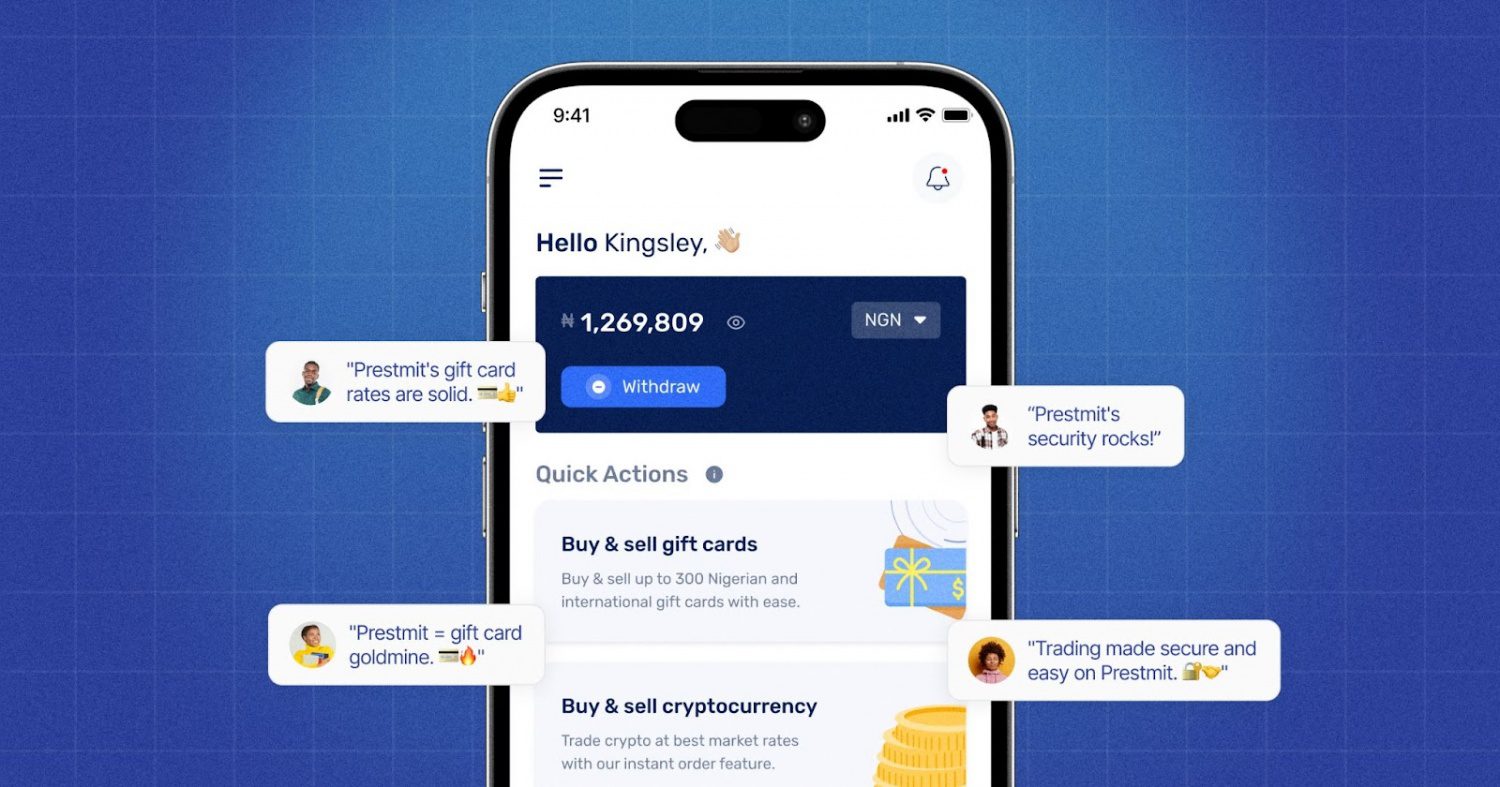
Whether you’re planning to buy a newly released game or top up your Steam Wallet, having quick access to a Steam gift card makes the process much easier. With Prestmit, you can buy a Steam gift card and pay with Naira and receive your e-code within minutes. Aside from Naira, you can also pay with other supported payment methods such as Cedis, USD, and cryptocurrencies.
The platform offers Steam gift cards in different denominations, allowing you to choose an amount that matches your gaming budget. We also provide fast delivery, so you receive your gift cards in your mail immediately after completing your purchase. This allows you to redeem it and start shopping on Steam without unnecessary delays.
Prestmit uses account protection features and transaction security measures like biometric authentication, two-factor authentication (2FA), and SSL encryption to help safeguard you and your account from third parties and fraud. In addition, our customer support is available to assist you at any time if you have any questions or inquiries.
Step-By-Step Guide on How to Buy Steam Gift Cards With Naira on Prestmit
Below is a simple step-by-step guide on how to buy your Steam gift card on Prestmit:
Step 1: Create an account and log in
Visit the Prestmit website or download their app from the Google Play Store or the App Store. Create an account and log in, or simply log in with your details if you already have an account.
Step 2: Select “Gift Cards”
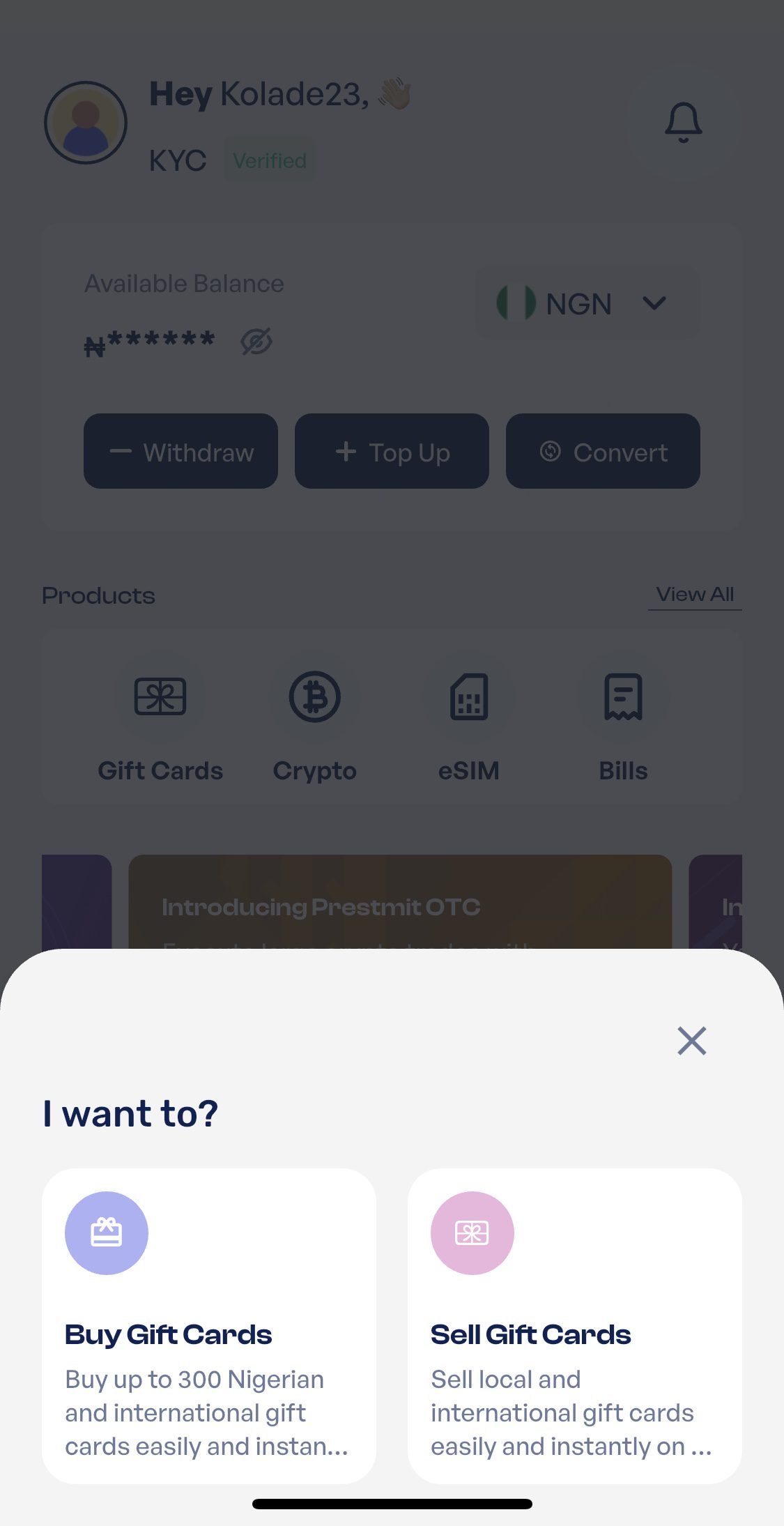
Screenshot
Select “Gift Cards” on the homepage, then select “Buy Gift Cards” from the subsequent menu.
Step 3: Choose your preferred Steam gift card
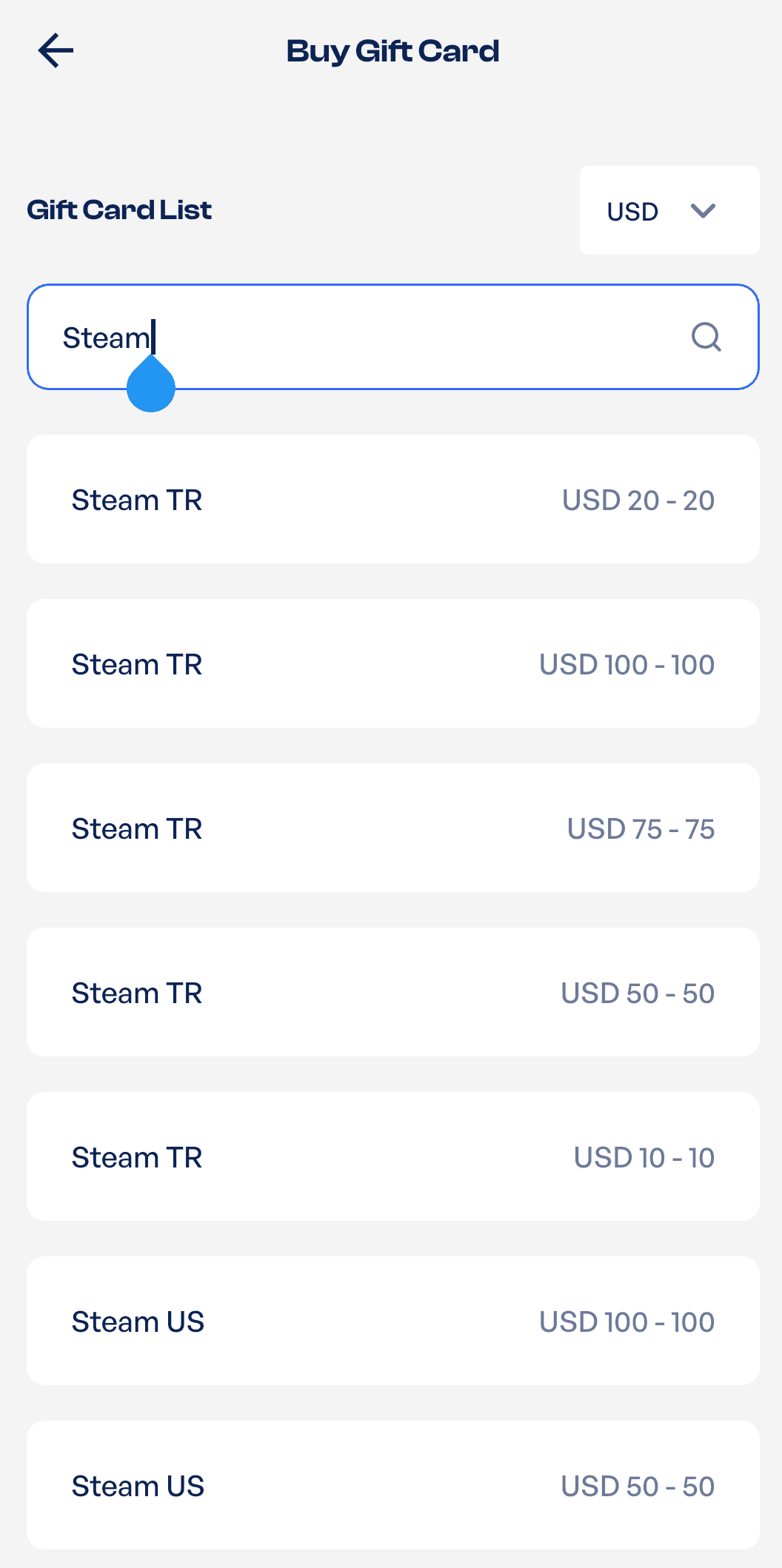
Enter “Steam” in the search box and choose your preferred Steam gift card from the options displayed
Step 4: Enter your amount and quantity
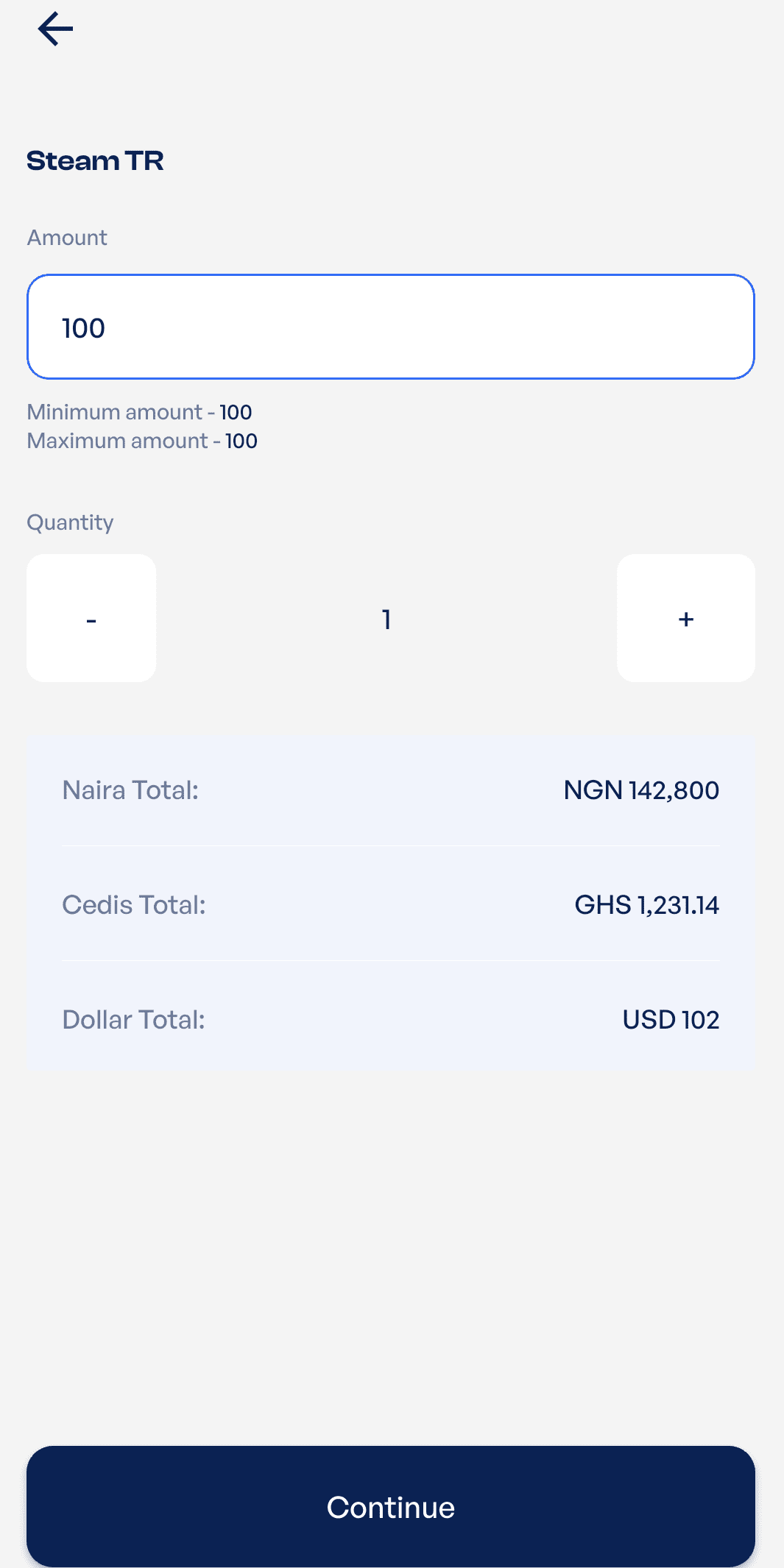
Enter the amount and quantity you want to buy them, and click on “Continue” to proceed to the next step
Step 5: Confirm your gift card details
The amount you’ll pay will be displayed for your review in Naira and other currencies. Confirm this and your gift card details to ensure they’re all correct. Check the “Terms and Conditions” box and then click on “Proceed”
Step 6: Select “Naira” as your payment method
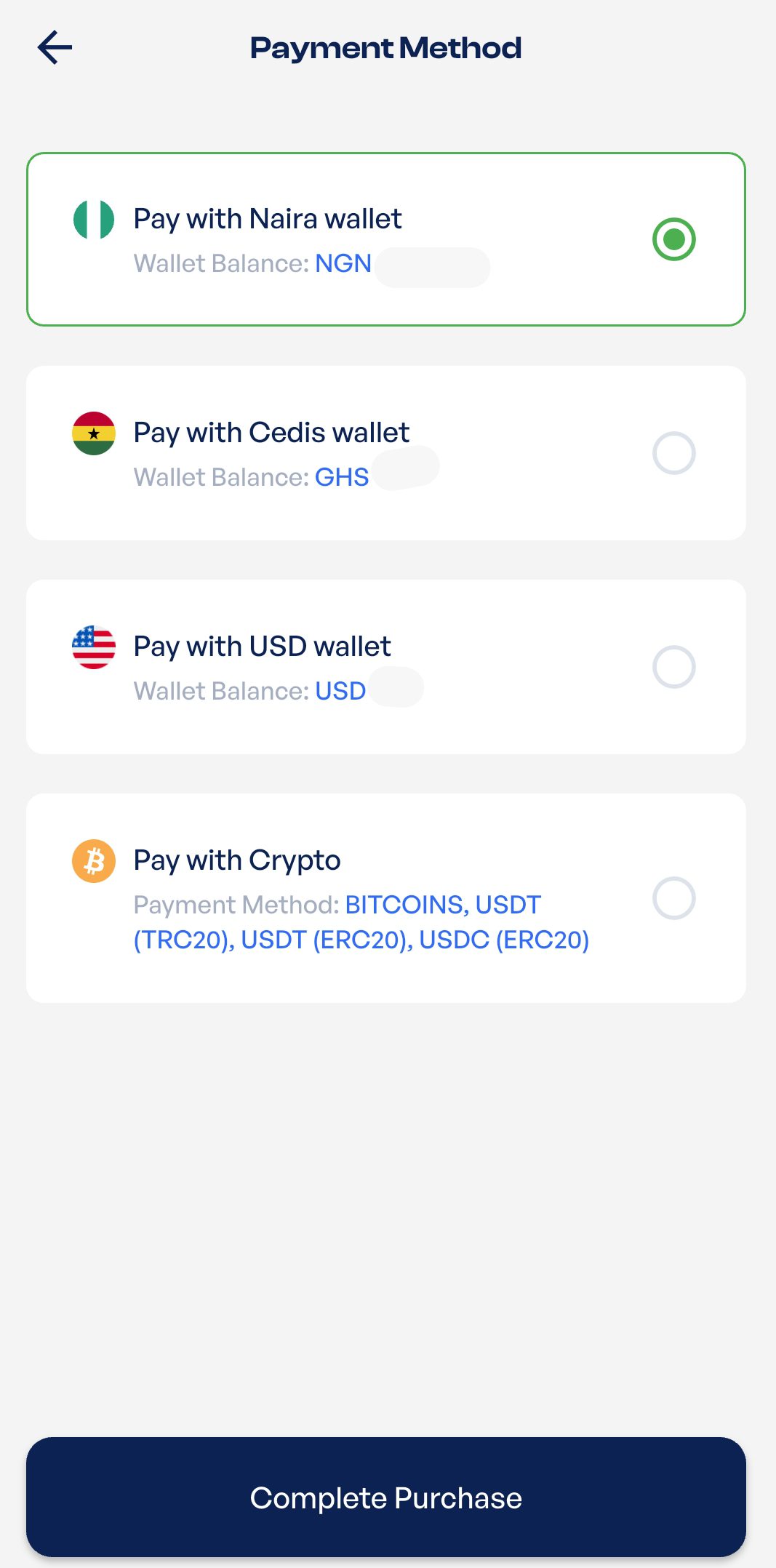
Choose “Pay With Naira” as your preferred payment method and then click on “Complete Purchase”
Step 7: Submit the transaction and receive your code
Enter the 2-FA code sent to your registered email address and then click on “Submit.” Your gift card code will be sent to you instantly.
BUY YOUR STEAM GIFTS CARDS ON PRESTMIT NOW
Common Mistakes to Avoid When Buying Steam Gift Cards
1. Buying from unverified platforms
One of the most common mistakes people make when buying Steam gift cards is buying from unknown sellers, social media accounts, or unverified websites because they offer lower prices. While the discount may seem attractive, it can result in receiving invalid, used, or fake gift card codes.
In some cases, you can pay for a card and never receive the code at all. To reduce the risk of fraud, always buy from reputable platforms with a proven track record, secure payment systems, and responsive customer support.
2. Choosing the wrong Steam gift card region
There are different types of Steam gift cards, and they work differently. Steam has introduced regional restrictions in some countries, which means a gift card purchased for one region may not be redeemable on an account registered in another region.
Many buyers overlook this requirement and only discover the issue when they want to redeem the card. Before buying a Steam gift card, confirm that the gift card is compatible with your Steam account region to avoid redemption errors and unnecessary frustration.
3. Buying the wrong gift card denomination
Buying a Steam gift card without calculating how much Steam Wallet balance leads to buying the wrong denomination. For example, a game may cost more than the value of the gift card you purchased.
This can leave you with insufficient funds to complete the transaction and force you to buy another gift card. Before purchasing a card, check the current price of the game, downloadable content (DLC), software, or in-game item you intend to buy, and choose a denomination that adequately covers the cost.
4. Entering incorrect account or payment information
Simple mistakes during checkout can create unnecessary delays. Entering the wrong email address, selecting the wrong gift card type, or providing incorrect payment details can affect the delivery process or cause transaction failures. Before confirming your purchase, carefully review all information to ensure everything is accurate.
5. Waiting too long to redeem the gift card
Many buyers receive their Steam card code and postpone redeeming it. Although Steam gift cards generally don’t expire, delaying redemption increases the risk of losing the code, accidentally deleting the delivery message, or being unable to locate the card information when you need it.
Redeeming the code soon after you buy it will ensure the balance is safely added to your Steam Wallet.
6. Failing to protect the gift card code
A Steam gift card code is essentially digital money. Sharing the code with others, posting screenshots online, or storing it in an insecure location can lead to unauthorized use. The funds can’t be recovered once someone else redeems the code. Always keep your gift card details private and store them securely until they are redeemed.
Frequently Asked Questions
1. What can I use a Steam gift card for?
You can use a Steam Gift Card to add funds to your Steam Wallet and purchase games, downloadable content (DLC), software, in-game items, and other digital products available on Steam.
2. How long does it take to receive a Steam gift card after purchase?
Delivery times vary depending on the platform. Prestmit offers fast delivery, and your gift card codes are typically delivered shortly after payment is confirmed.
3. Can I redeem a Steam gift card on any Steam account?
You can redeem a Steam Gift Card on your Steam account as long as the card is compatible with your account’s region and Steam’s redemption requirements.
4. Is it safe to buy Steam gift cards online?
Yes, provided you purchase from reputable and trusted platforms like Prestmit with secure payment systems and customer support.
5. Do Steam gift cards expire?
Steam Gift Cards generally don’t expire. However, it is advisable to redeem them soon after purchase and review any terms attached to the specific card.
Conclusion
Buying a Steam Gift Card with Naira in Nigeria is now a simple and convenient process, especially when you use a reliable platform like Prestmit. With the right gift card, you can easily fund your Steam Wallet and enjoy access to thousands of games, downloadable content, software applications, and in-game purchases available on Steam.
Whether you’re a casual gamer or a dedicated gaming enthusiast, Prestmit provides a fast, secure, and convenient way to buy Steam Gift Cards with Naira and receive your code instantly.
Last updated on June 23, 2026