Table of Contents
Managing everyday payments should not require switching between multiple apps, searching for different payment platforms or spending unnecessary time completing transactions. Whether you need to recharge your phone, pay electricity bills, renew your cable TV subscription or fund your betting account, having these services accessible from one platform makes payment management more convenient.
Prestmit helps users manage several digital transactions from one place, including airtime, data, utility bills and betting wallet funding. Instead of treating every payment as a separate task, you can use the Prestmit app to complete different transactions from your wallet.
For Nigerians who regularly pay household bills or fund betting accounts, understanding how these features work can help make transactions easier to manage. Here is how to pay bills and fund betting accounts on Prestmit.
What Bills Can You Pay on Prestmit?

Prestmit offers several bill-payment services that allow users to manage recurring payments and everyday expenses from one platform.
1. Electricity Bills
You can purchase prepaid electricity tokens or pay postpaid electricity bills through Prestmit. The platform supports major Nigerian electricity distribution companies, including Ikeja Electric (IKEDC), Eko Electricity (EKEDC), Abuja Electricity (AEDC)and others.
For prepaid meters, you receive a token after successful payment, which you can load onto your meter. For postpaid meters, payment is applied to your electricity account.
2. Cable TV Subscriptions
If you want to renew your cable subscription, Prestmit supports providers such as DStv, GOtv and StarTimes. You can select your preferred provider, choose a subscription package and pay without having to navigate multiple payment channels.
3. Airtime and Data
Prestmit also allows you to recharge airtime and purchase mobile data for supported Nigerian networks. This is useful for keeping your phone connected, renewing internet access and managing communication expenses.
4. Betting Account Funding
Prestmit offers betting account funding for supported platforms such as NairaBet, Sportybet, 1xbet, Bet9ja, BetKing, etc. in Nigeria. Users can select a supported provider, enter their account Customer ID and amount, and complete the payment using an available payment source.
Betting involves financial risk, and funding an account does not guarantee winnings. Only participate if you are of legal age and can afford to lose the money you spend.
How to Pay Bills on Prestmit
Paying bills on Prestmit is straightforward. You can complete your transactions through the mobile app by following these steps.
Step 1: Create an Account or Log In
Visit the official Prestmit website or start by downloading the Prestmit app from the Google Play Store or the Apple App Store
Step 2: Fund Your Prestmit Wallet
Tap Top Up on the homepage and follow the instructions to generate your virtual account if you have not created one. Transfer funds to the account to credit your Prestmit wallet. If your wallet is already funded, you can proceed.
Step 3: Select Bills
From the homepage, tap Bills to access the available bill-payment services. Choose the category you want to pay for, such as electricity, cable TV, airtime or data.
Step 4: Enter Your Payment Details
Select your service provider and enter the required details. For electricity, this may include your meter number and meter type. For cable TV, you will need your smart card or customer number and subscription package.
Step 5: Review and Confirm Your Payment
Enter the amount, select your payment source and carefully review the transaction details. Confirm your payment with your PIN to complete the transaction.
Step 6: Check Your Transaction Status
After payment, check your transaction history for confirmation. Electricity tokens may be delivered to your registered email and appear in your transaction history, while cable TV subscriptions are renewed after successful payment.
Tip: Always confirm your meter number, smart card number, provider and payment amount before authorising a bill payment. Completed transactions sent to incorrect account details may not be reversible.
How to Fund a Betting Account on Prestmit
Prestmit also provides a betting account funding feature for supported platforms. If you choose to use this service, follow the steps carefully to avoid sending funds to the wrong account.
Step One: Create a Prestmit Account
Visit the official Prestmit website or start by downloading the Prestmit app from the Google Play Store or the Apple App Store
Step Two: Create a Virtual Bank Account
After signing in, create your virtual bank account if you haven’t done so already. Tap “Top Up” on the homepage and follow the prompts to generate your dedicated virtual account number.
Transfer money from your account to the virtual account to fund your Prestmit wallet. If you’ve previously created a virtual account, you can skip this step and fund your wallet directly.
Step Three: Click On “Bills” On The Homepage
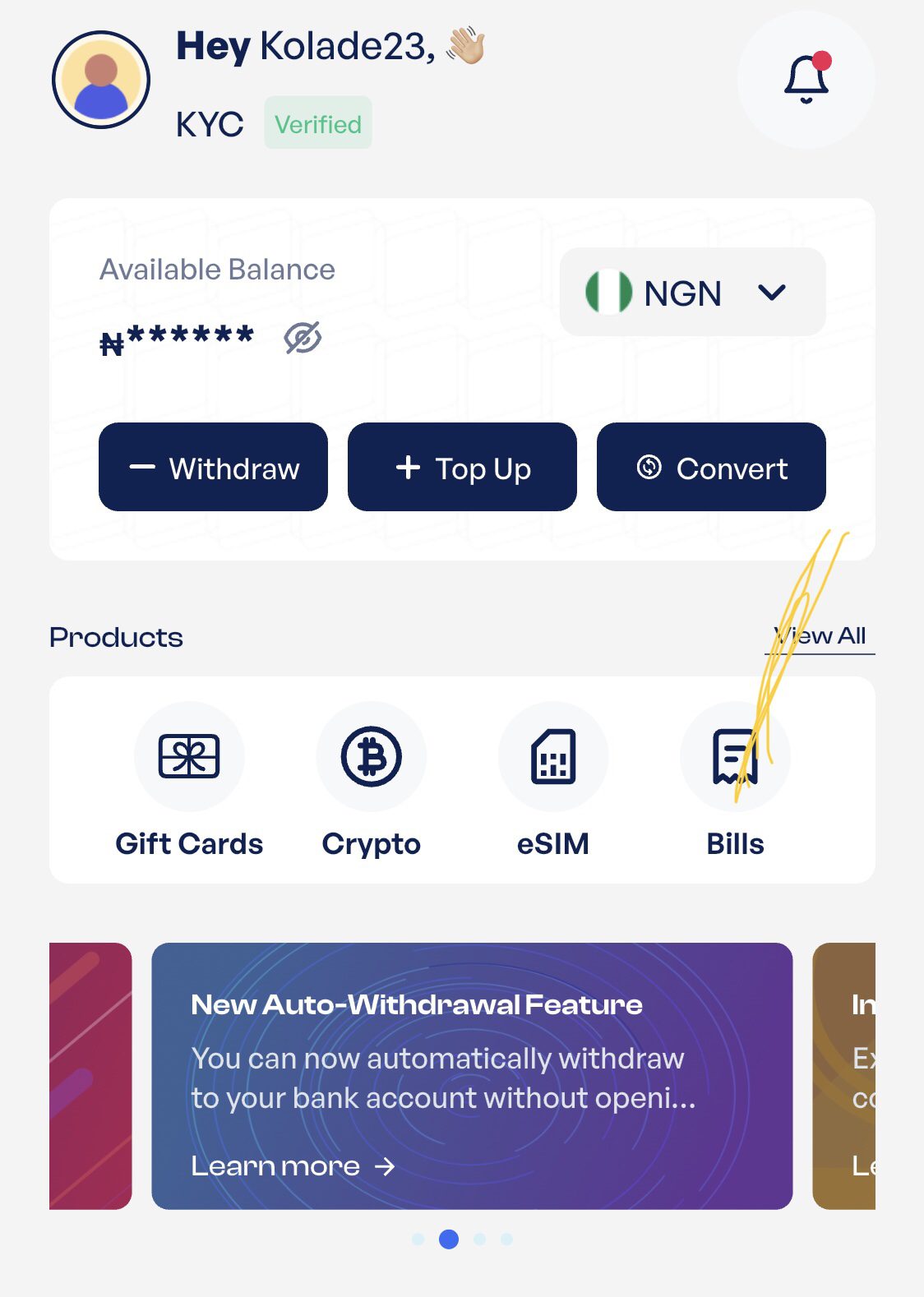
Once your wallet has been funded, return to the homepage and tap “Bills”. Select “Fund Betting Account” from the list of available bill payment services.
Step Four: Enter Your Funding Details
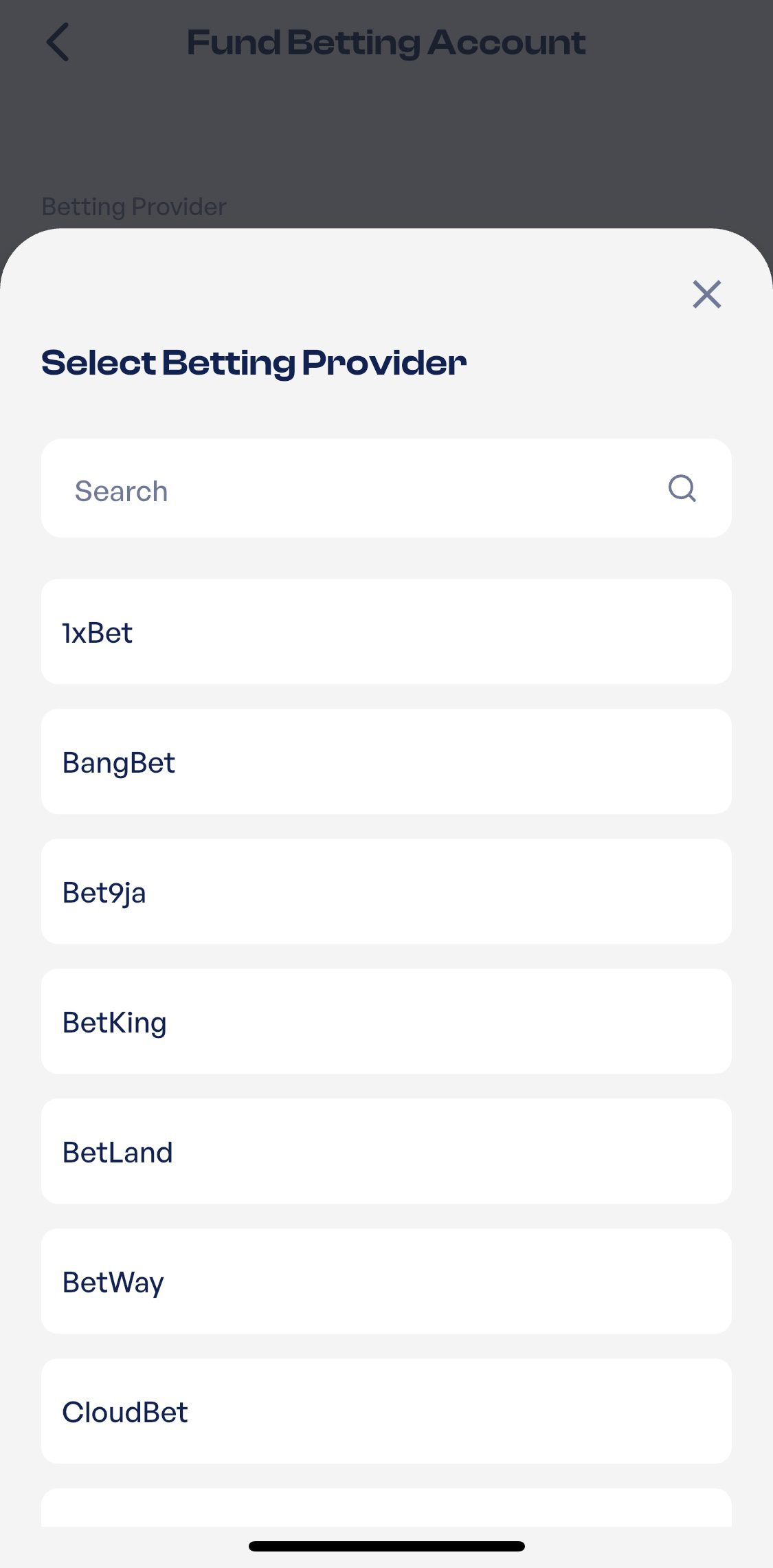
Select your preferred betting platform, enter your customer ID, customer name, and the amount you want to deposit. Review all the information carefully before and click on “Continue.” Once your payment is successful, the deposit will be sent to your betting account.
Note: Confirm your Customer ID before completing the transaction. Prestmit’s help guide warns that completed betting account top-ups sent to the wrong ID cannot be reversed.
What to Do If Your Deposit Doesn’t Reflect in Your Account
Most betting deposits reflect within a few minutes after a successful payment. However, there are times when a deposit may take slightly longer because of temporary network issues, system maintenance, or delays on the betting platform’s end.
If your betting wallet hasn’t been credited, don’t panic. Follow these steps before contacting support:
- Confirm that your payment was successful: Check your Prestmit transaction history to ensure the transaction shows as successful and wasn’t declined or left pending.
- Give it a few more minutes: Although most deposits are processed almost instantly, some betting platforms may take a little longer to update your wallet balance.
- Refresh your betting account: Log out of your betting account, sign in again, or refresh the app or website to see if your balance has updated.
- Verify your customer ID: Ensure you entered the correct customer ID or username when making the payment. A wrong betting ID may send the deposit to a different account.
- Check your payment details: Review the betting platform you selected, the funding amount, and other transaction details to confirm everything was entered correctly.
- Contact Prestmit customer support: If your deposit still hasn’t reflected after waiting for a reasonable period, reach out to Prestmit’s customer support through the official support channels. Have your transaction ID, customer ID, payment amount, and transaction time ready to help the support team investigate and resolve the issue as quickly as possible.
Benefits of Paying Bills and Managing Transactions on Prestmit
1. Convenience
You can access several payment services from one platform without repeatedly switching between different apps or websites. This simplifies routine transactions such as electricity payments, cable renewals and mobile recharges.
2. Easy Transaction Tracking
Prestmit provides transaction history that helps you review completed payments, check transaction statuses and keep track of your digital transactions.
3. Multiple Payment Services
From airtime and data to electricity, cable TV and other supported services, Prestmit provides access to several payment categories within one app.
4. Simple Payment Process
The platform’s straightforward interface allows users to select a service, enter the necessary details, review the payment and confirm the transaction without navigating complicated processes.
Frequently Asked Questions
1. Can I pay electricity bills on Prestmit?
Yes. Prestmit supports prepaid and postpaid electricity bill payments for major Nigerian electricity distribution companies. Select your provider, enter your meter details and complete your payment.
2. Which cable TV subscriptions can I renew on Prestmit?
Prestmit supports cable TV providers such as DStv, GOtv and StarTimes. Available packages depend on the provider selected within the app.
3. Can I fund my betting account on Prestmit?
Yes. Prestmit supports funding accounts on multiple betting platforms. Select the provider, enter your Customer ID and funding amount, and confirm your transaction. Betting carries financial risk, so only spend what you can afford to lose.
4. How do I fund my Prestmit wallet?
Tap Top Up on the homepage, generate your virtual account if necessary and transfer funds into it. Once the money reflects in your Prestmit wallet, you can use it for supported transactions.
5. What happens if my bill payment does not reflect?
Check your Prestmit transaction history first to confirm the status. If the payment is successful but the service provider has not updated your account, allow time for processing and contact Prestmit support with your transaction ID if the issue persists.
6. Can I pay someone else’s bills on Prestmit?
Yes. You can pay bills for another person as long as you enter the correct service provider and customer details, such as their meter number or cable TV smart card number.
Manage Your Everyday Payments with Prestmit
Paying bills and managing digital transactions should be straightforward. From purchasing electricity tokens and renewing cable subscriptions to buying airtime and data, Prestmit gives you access to multiple payment services in one app.
With a simple payment process, wallet funding options and transaction tracking, you can manage everyday bills without unnecessary hassle. If you choose to use the betting account funding feature, remember to verify your account details and gamble responsibly.
Download the Prestmit app today and enjoy a more convenient way to pay bills, recharge and manage your digital transactions.